
Table of Contents
- What Makes a Gaming Mouse Pad Durable for Home Office Use?
- Key Features to Check Before You Choose
- Stitched Edge Mouse Pad Benefits: Why Edges Matter
- Hard vs Soft Mouse Pad Durability: Which Lasts Longer?
- How to Clean a Gaming Mouse Pad to Make It Last
- Long-Term Maintenance and Material Degradation
- Conclusion: Choose a Pad That Keeps Up with Your Setup
- Frequently Asked Questions
Last Updated: October 2, 2026
What Makes a Gaming Mouse Pad Durable for Home Office Use?
Your mouse pad is quietly dying — and it's making your aim worse. If you're hunting for a durable gaming mouse pad for your home office, here's how to tell what's failing and what to buy so you stop replacing it every few months.
Key Features to Check Before You Choose
Durability comes down to four things: surface material, edge construction, base grip, and size. Get these right and you won't think about your pad again for years.
Surface Material and Texture
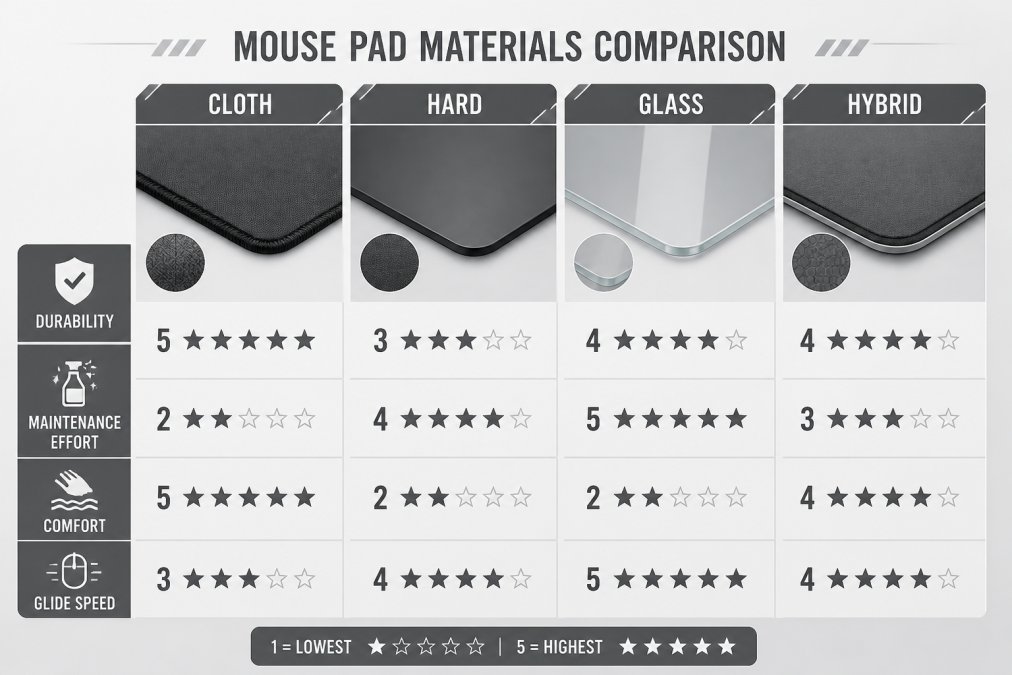
Soft cloth surfaces dominate for a reason. According to Fortune Business Insights' mouse pad market forecast, the soft pad segment leads the global market thanks to high flexibility and durability. A high-density weave resists surface wear and keeps tracking accuracy steady. Hard and glass surfaces glide faster but demand constant dusting to stay usable.
Stitched vs. Non-Stitched Edges
Stitched edges are the single biggest durability upgrade you can buy. Without stitching, the top fabric layer separates from the base within months of heavy use. Stitching locks the layers together and prevents fraying at the corners, which is where most pads fail first.
Stitched Edge Mouse Pad Benefits: Why Edges Matter
A stitched edge mouse pad prevents fraying, keeps the surface layers bonded, and extends usable life well beyond an unstitched pad. The edge is where most pad failures start, and for a home office pad that gets eight hours of daily wrist contact, the edge is under constant mechanical stress.
Here's what stitching actually does at a mechanical level:
- Fraying prevention: The thread binds the top cloth to the rubber base, so the two layers can't delaminate at the corners. Without stitching, the adhesive bond is the only thing holding them together, and adhesive fails first under repeated wrist pressure.
- Edge durability: Rounded, reinforced borders absorb wrist contact and keyboard bumps instead of cracking. A raw-cut edge develops micro-frays within weeks, and those frays propagate inward.
- Consistent surface tension: The stitched border acts like a seam allowance, keeping the pad flat instead of curling. Curled edges are the number-one complaint in long-term owner reviews.
- Better tracking near borders: No lifted fabric means your optical sensor doesn't hit a shadow or a gap when you sweep to the edge of the pad.
Stitch density: the spec most buyers ignore
Stitch density, the number of stitches per inch, is the single best predictor of edge longevity. A dense, even stitch line (roughly 8-12 stitches per inch on quality pads) distributes stress across many contact points. Sparse stitching (4-6 per inch) concentrates force on fewer threads, so one broken stitch cascades into a full edge failure.
- Even spacing with no gaps or double-stitches
- No loose thread tails at the four corners, these are where unraveling begins
- A slight raised lip where the stitch meets the cloth, which signals the thread is biting into both layers, not just the top
Why this matters more for home office than for gaming
A gamer's wrist moves in bursts. An office worker's wrist rests on the same edge for hours, often with the forearm pressing down. That sustained load is what kills unstitched pads, not speed, not sweeps. If you work at your desk five days a week, stitched edges aren't a premium feature; they're the baseline durability requirement.
Hard vs Soft Mouse Pad Durability: Which Lasts Longer?
Soft cloth pads last longer for most home office users, but hard pads have their place. Cloth wins on comfort, quiet glide, and cost of replacement. Hard surfaces resist spills better but scratch, and they must stay perfectly dust-free to track well, a maintenance burden most desk workers underestimate.
Feature |
Soft Cloth |
Hard Surface |
|---|---|---|
Durability |
2-4 years with stitching |
3-5 years, scratch-prone |
Maintenance |
Washable, low effort |
Dust-free constantly |
Comfort |
High, ergonomic support |
Low, firm feel |
Glide |
Controlled stopping power |
Fast, low friction |
Best For |
Home office, long sessions |
Speed-focused gaming |
How to Clean a Gaming Mouse Pad to Make It Last
Washing your pad is the cheapest durability upgrade available. Machine-washable mats with rubber bases hold up best, per TechGearLab's tested mouse pad rankings, which found they deliver the most consistent tracking and durability for home offices.
Follow this routine:
- Vacuum loose dust weekly with a soft brush attachment
- Hand wash every 2-3 months in cool water with mild soap
- Never use hot water or a dryer, which warp the rubber base
- Air dry flat, away from direct sunlight
- Spot-clean spills immediately to protect any liquid-resistant coating
Throwing a cloth pad in a hot dryer breaks down the rubber base and destroys the non-slip grip. Air dry only, or you'll be buying a replacement within weeks.
Long-Term Maintenance and Material Degradation
Every pad degrades. The question is how slowly, and most guides stop at 'clean it sometimes.' For durable gaming mouse pads in a home office, the real lever is a maintenance schedule tied to how the surface actually wears.
Why fabric pads slow down: the friction-change mechanism
A new cloth pad has a raised micro-weave. Your mouse skates ride on the peaks of that weave, which is why glide feels fast and consistent. Over months of use, three things happen:
- Weave compaction: Repeated pressure from your palm and mouse flattens the peaks, increasing the contact area between skate and surface. More contact means more friction, the pad feels 'slower' even though nothing is visibly broken.
- Oil and skin-cell buildup: Sebum from your wrist and hand fills the valleys of the weave, creating a tacky film that grabs the mouse feet. This is the biggest cause of 'my pad suddenly feels sticky' complaints.
- Micro-abrasion: Dust and grit trapped in the weave act like sandpaper on both the pad surface and your mouse skates, accelerating wear on both.
A maintenance schedule that extends pad life
Most pads fail from neglect, not from manufacturing defects. This schedule is built around the three degradation mechanisms above:
Frequency |
Action |
Why |
|---|---|---|
Daily |
Wipe surface with a dry microfiber cloth |
Removes dust before it works into the weave |
Weekly |
Vacuum with a soft brush attachment |
Lifts grit from valleys without abrading the surface |
Monthly |
Wipe with a slightly damp microfiber cloth (water only) |
Removes the oil film that causes sticky glide |
Every 2-3 months |
Hand wash in cool water with mild soap |
Deep-cleans compacted weave and restores surface texture |
Every 6 months |
Inspect edges and base |
Catches early fraying and grip loss before they become terminal |
Never use hot water, alcohol, or abrasive cleaners on a cloth pad. Hot water warps the rubber base and destroys the non-slip grip. Alcohol strips the surface treatment and can leave the weave permanently rougher.
Wear patterns to watch for
- Shiny patches where the weave has compacted, glide will be noticeably slower in that zone
- Curled edges signaling base separation or adhesive failure
- Inconsistent glide from uneven surface degradation, often worst where your wrist rests
- Lost grip underneath from a worn or oil-contaminated rubber base
The rotation strategy
If you game and work at the same desk, rotating two pads extends the life of both. Each pad gets half the daily load, so weave compaction and oil buildup happen at half the rate. A dedicated extended desk mat under your main pad also keeps the primary surface cleaner by catching crumbs and dust before they reach it.
Durability isn't just about what you buy, it's about what you do after. A pad with stitched edges and a high-density weave, maintained on a simple monthly schedule, will outlast a premium pad that's never cleaned.
r/MousepadReview community testing on surface friction change
Conclusion: Choose a Pad That Keeps Up with Your Setup
Replacing a frayed pad every few months costs more than buying one good one. Stitched edges, a high-density weave, and a solid non-slip rubber base are the features that matter, and they're the ones Lone Wolf Art builds into every gaming mouse pad we make. Our pads pair original wolf-inspired artwork with the durability your home office setup demands. Choose Lone Wolf Art for a desk that looks sharp and holds up.
Frequently Asked Questions
What is the best mouse pad for home office use?
A soft cloth pad with stitched edges and a non-slip rubber base works best for most home offices. Machine-washable mats with rubber bottoms provide the most consistent tracking and durability, according to TechGearLab (2025). Look for a micro-woven cloth surface for smooth glide and a base that grips your desk. If you value easy cleaning and long-term wear resistance, this combination balances comfort, tracking accuracy, and longevity.
What is the most durable mouse pad?
Soft pads with stitched edges and high-density rubber bases typically last longest. The soft pad segment dominates the market due to high flexibility and durability (Fortune Business Insights, 2024). Hard or glass pads resist surface wear but require constant dust-free maintenance. For home office use, a thick cloth pad with stitched edges and a non-slip rubber base offers the best balance of durability and low upkeep.
How do I clean a gaming mouse pad to make it last longer?
Hand wash with lukewarm water and mild soap, then air dry completely before use. Machine-washable mats with rubber bottoms provide the most consistent tracking and durability for home office environments (TechGearLab, 2025). Avoid harsh chemicals and direct heat, which can break down the rubber base and cause fraying. Clean every few months, or sooner if you eat at your desk, to prevent surface friction from building up.
Why do pros not use glass mousepads?
Glass pads offer fast glide but demand constant cleaning because dust and oils quickly affect tracking. High-performance surfaces require high maintenance to remain usable (YouTube: The BEST mouse pad for EVERY GAMER, 2025). They also feel cold and hard, which can cause wrist fatigue during long sessions. For a home office, a soft pad with stitched edges and a non-slip rubber base is more practical and comfortable for all-day use.