
Table of Contents
- Kawaii vs Minimalist Gaming Setup: The Core Difference
- Kawaii Gaming Setup Ideas: Personality and Color
- Minimalist Gaming Setup Ideas: Clean Lines and Simplicity
- Gaming Desk Organization Ideas: Cable Management and Layout
- Aesthetic Mouse Pads for PC Gaming: The Finishing Touch
- Budget and Upgrade Paths: What You'll Actually Spend
- Hybrid Setups: Blending Kawaii and Minimalist Elements
- Common Mistakes to Avoid When Building Your Gaming Station
- Frequently Asked Questions
Last Updated: October 17, 2026
Kawaii vs Minimalist Gaming Setup: The Core Difference
Pastel plushies or clean black steel? When it comes to a kawaii gaming setup vs minimalist setup, your desk should feel like yours — not like a showroom.
At Lone Wolf Art, we work with gamers who want their desk to reflect who they are.
The difference matters beyond looks: a kawaii setup needs more desk space for decor, while a minimalist setup demands discipline to keep clutter out.
Kawaii Gaming Setup Ideas: Personality and Color
Kawaii setups are about self-expression. Think pastel colors, cute character figurines, colorful cable management, and a desk that tells a story about what you love. These setups celebrate personality over minimalism.
Design Principles Behind Kawaii Setups
Kawaii design starts with color. Pastels, soft pinks, mint greens, lavender, light blues, create a welcoming, playful vibe.
Layering is the second principle: a cute desk pad, colorful keychains, warm-toned LED strips, character posters, and matching visible cable sleeves.
Personalization is non-negotiable. Your desk should reflect your interests, anime, gaming franchises, cute animal themes, or niche communities.
Typical Kawaii Desk Components
A kawaii gaming setup usually includes:
- Colorful mouse pad: Your desk surface sets the tone. A vibrant, patterned mouse pad anchors the whole aesthetic. Lone Wolf Art's gaming mouse pad comes in custom designs that add personality without overwhelming the desk.
- LED ambient lighting: Soft, warm-toned LED strips behind the monitor or along shelves create mood and depth.
- Character figurines or plushies: Small collectibles on shelves or desk corners add visual interest.
The goal is a desk that feels intentional and joyful, not sterile.

Minimalist Gaming Setup Ideas: Clean Lines and Simplicity
Minimalist setups prioritize function over decoration. Every item on your desk serves a purpose. Your monitor, keyboard, mouse, and gaming chair are the stars. Everything else either supports performance or disappears.
Design Principles Behind Minimalist Setups
Minimalism starts with constraint: fewer items, each chosen deliberately.
Color discipline is essential: a neutral palette, black, white, gray, or natural wood, with at most one accent color. The impression is calm and unified.
Cable management becomes invisible: all cables route behind the desk, through trays, or hidden entirely. Nothing dangles or competes for attention.
Typical Minimalist Desk Components
A minimalist gaming setup includes:
- Single or dual monitor setup with slim bezels: Monitors are the primary visual element. Slim bezels maximize screen space while keeping the profile clean.
- Ultrawide monitor option: If you want more screen real estate, a single ultrawide monitor is more minimalist than multiple standard monitors.
- Monitor arm: A single articulating arm holds the monitor, freeing up desk space and allowing precise height adjustment.
The minimalist desk is a tool. It's optimized for gaming and work, with zero visual noise.
Gaming Desk Organization Ideas: Cable Management and Layout
Organization is where kawaii and minimalist setups stop being aesthetics and start being daily work. The two styles demand different habits, hardware, and ongoing effort, here are the trade-offs most setup guides skip.
Cable Management: Visible vs Invisible
The core difference is whether cables are part of the design or hidden from it.
Kawaii approach, cables as decor:
- Colored cable sleeves (pastel, rainbow, or themed) turn cables into an accessory.
- Cables route along desk edges in visible but tidy runs, clipped with colorful clips.
- The goal is intentional visibility: nothing dangles, but nothing is hidden.
- Trade-off: visible cables collect dust and need re-clipping, and adding a peripheral means re-styling the run.
Minimalist approach, cables as absence:
- Cables route through under-desk trays, cable spines, or wall-mounted channels.
- Sleeves are black or gray to disappear against the desk and wall.
- The goal is zero visible cable at the seated viewing angle.
- Trade-off: setup takes longer upfront, and swapping a component means re-routing through the tray.
Desk Layout and Ergonomics
Both styles should follow the same ergonomic baseline, but aesthetics can pull them off course.
- Monitor height: Top of the screen at or slightly below eye level. A monitor arm makes this easy and is common in minimalist builds; kawaii builds often rely on the stock stand, which may not adjust enough.
- Viewing distance: Roughly arm's length. Ultrawide monitors need more distance than a single 24" panel.
- Keyboard and mouse position: Elbows near 90 degrees, wrists neutral. A thick, plush kawaii desk mat can raise the wrist, check it isn't bending upward.
- Lighting glare: LED strips behind the monitor should not reflect on the screen. Bias lighting works best facing the wall, not the panel.
Maintenance and Clutter Over Time
This trade-off matters more than the first-day photo.
| Factor | Kawaii setup | Minimalist setup |
|---|---|---|
| Dusting | More surfaces (figurines, plushies, textured mats) | Fewer surfaces, faster to wipe down |
| Clutter risk | High, small items accumulate | Low, but one misplaced item stands out |
| Reorganizing | Frequent, as decor rotates | Rare, unless gear changes |
| Small-room fit | Can feel crowded if decor is dense | Fits small rooms well but can feel sparse |
| Flexibility | Easy to swap decor seasonally | Harder to add personality later without breaking the look |
A common pattern: kawaii setups look best when decor is grouped into zones (one shelf, one corner) rather than spread across the desk. Minimalist setups look best when storage is built in, so the surface stays clear without effort.
Small-Room and Shared-Space Considerations
- Small rooms: Minimalist setups handle tight spaces better because vertical storage and monitor arms free up surface area. Kawaii setups work in small rooms if decor is concentrated on walls and shelves rather than the desk.
- Shared spaces: A hybrid approach, neutral base, one kawaii accent zone, is easier to live with when the room isn't exclusively yours.
- Streaming or video calls: A minimalist background reads as professional; a kawaii background reads as personality-forward. Neither is wrong, but the choice affects how the space is perceived on camera.
Labeling and Future-Proofing
Whatever style you choose, label cables at both ends so swapping a peripheral or moving the desk doesn't mean tracing five cables. Keep a small labeled bag for spare cables and adapters, the one habit that pays off equally in both styles.
Aesthetic Mouse Pads for PC Gaming: The Finishing Touch
Your mouse pad is one of the most visible and functional elements of your setup, where aesthetics and performance meet.
For kawaii setups, a colorful or patterned mouse pad becomes a statement piece that anchors your desk's color scheme. Lone Wolf Art's gaming mouse pad offers vibrant prints with a smooth polyester surface and rubber non-slip base.
For minimalist setups, choose a neutral-toned pad or skip it entirely if your desk surface is smooth.
The mouse pad's practical side matters too. A rubber base keeps it stable during intense gaming sessions.
Budget and Upgrade Paths: What You'll Actually Spend
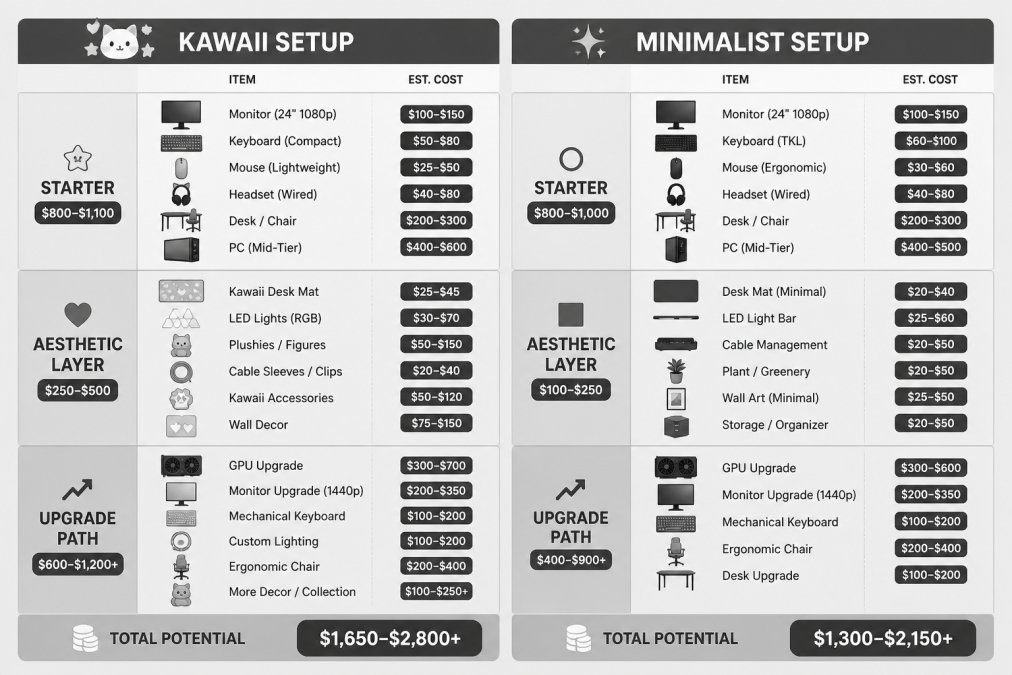
Most setup guides treat budget as a single number, hiding the real decision: kawaii builds front-load decor, lighting, and visible accessories, while minimalist builds front-load core gear and cable-hiding hardware. Here's where each style's money actually goes.
Tier 1: Starter Setup (Core Gear Only)
Both styles need the same foundation, monitor, keyboard, mouse, chair, and desk surface, and core gear lands in a similar range, because performance components don't care about aesthetics.
- Monitor: 24-27" 1080p or 1440p panel. This is the single biggest line item and the one worth stretching on.
- Keyboard and mouse: A wired or wireless combo. Kawaii builds often pay a small premium for pastel or themed keycaps; minimalist builds often pay a similar premium for low-profile or wireless designs.
- Chair: A supportive task or gaming chair. Neither style should compromise here.
- Desk: An existing desk works. If buying, a simple flat surface serves both styles equally.
At this tier, the two styles are close in cost. The divergence starts at Tier 2.
Tier 2: Aesthetic Layer (Where the Styles Diverge)
Kawaii aesthetic layer:
- Patterned or custom-printed desk mat
- LED strip lighting in warm or pastel tones
- Small figurines, plushies, or character accessories
- Colorful cable sleeves or wraps
Minimalist aesthetic layer:
- Neutral-toned desk mat (or none)
- Monitor arm to free desk space
- Under-desk cable tray and cable sleeves in black or gray
- Drawer or wall-mounted storage to keep the surface clear
The kawaii layer has more line items, each small; the minimalist layer has fewer, but the monitor arm and cable-management hardware cost more per piece. Kawaii spending spreads across many small purchases; minimalist spending concentrates in a few structural upgrades.
Tier 3: Upgrade Path
Upgrade priorities differ by style, and long-term spending diverges most here.
Kawaii upgrade path:
- Better lighting (dimmable LED strips, bias lighting behind the monitor)
- Higher-quality desk mat or a second themed mat for rotation
- Premium figurines or collectibles
- Themed keycaps or peripheral skins
- Display shelving for collectibles
Minimalist upgrade path:
- Better monitor (higher refresh rate, higher resolution, or ultrawide)
- Monitor arm or dual-arm mount
- Mechanical keyboard with a clean profile
- Premium chair with better ergonomics
- Under-desk PC mount or cable spine
Hidden Costs by Style
- Kawaii: Collectibles accumulate. It's easy to keep buying small items without a plan, so set a decor budget and stick to it. Dusting around figurines and plushies also takes more time.
- Minimalist: Cable-management hardware (trays, sleeves, mounts) adds up, and the discipline to keep the desk clear is ongoing. Replacing a component often means re-routing cables.
How to Decide
If you enjoy rotating decor, collecting, and changing your desk's look seasonally, the kawaii path rewards that. If you want to buy once, hide everything, and forget about the desk, the minimalist path rewards that. Budget for the path you'll actually maintain, not the one that looks best in a single photo.
Hybrid Setups: Blending Kawaii and Minimalist Elements
You don't have to choose, many gamers blend both aesthetics.
Alternatively, start with a kawaii setup and apply minimalist discipline to cable management and organization: keep the colorful aesthetics but hide the cables completely, and give accessories designated spots so nothing looks scattered.
The hybrid approach works especially well in shared spaces or if you're uncertain about committing fully to one style. You get visual interest without overwhelming the room.
Common Mistakes to Avoid When Building Your Gaming Station
Start with your monitor and chair, your foundation.
Another common error: ignoring ergonomics for style.
Don't underestimate cable management.
For kawaii setups specifically, avoid over-accessorizing. A cluttered desk defeats the purpose.
For minimalist setups, don't strip away all personality in pursuit of emptiness.
Finally, don't ignore performance for appearance.
Whatever direction you choose, start with a quality mouse pad that matches your aesthetic.
Frequently Asked Questions
What is the difference between a kawaii and minimalist gaming setup?
Kawaii gaming setups prioritize personality and visual interest through pastel colors, cute decor, and visible accessories. Minimalist setups focus on clean lines, neutral tones, and hidden cable management to reduce clutter. Kawaii celebrates abundance and self-expression; minimalist values simplicity and function. Your choice depends on whether you want your gaming station to feel cozy and personalized or calm and organized.
Can a gaming setup be both kawaii and minimalist?
Yes. A hybrid approach uses minimalist desk organization and cable management as the foundation, then adds select kawaii elements like a pastel keyboard or aesthetic mouse pad. This keeps your workspace functional and uncluttered while letting you express personality through carefully chosen accessories. The key is intentional selection rather than filling every surface with decor.
Which gaming setup style is easier to keep organized?
Minimalist setups are typically easier to maintain because they have fewer items to manage and hidden cable systems. Kawaii setups require more active organization since they feature more visible accessories and decor. However, both can stay organized with a system: minimalist relies on consistent decluttering, while kawaii benefits from designated zones for decor and regular dusting of accessories.
What accessories work best for a kawaii gaming desk?
Pastel-colored keyboards, cute desk organizers, ambient lighting with warm tones, small figurines, and aesthetic mouse pads create a cohesive kawaii gaming station. Wall art, fairy lights, and colorful cable sleeves add personality without overwhelming the space. Choose accessories that reflect your interests, gaming-themed cute decor, anime-inspired pieces, or soft color-coordinated items all work well for building a personalized battlestation.